Features
Everything below runs on the phone with no connection. The dashboard is the only part that needs one, because it is showing you other people's records.
Take 5 assessments
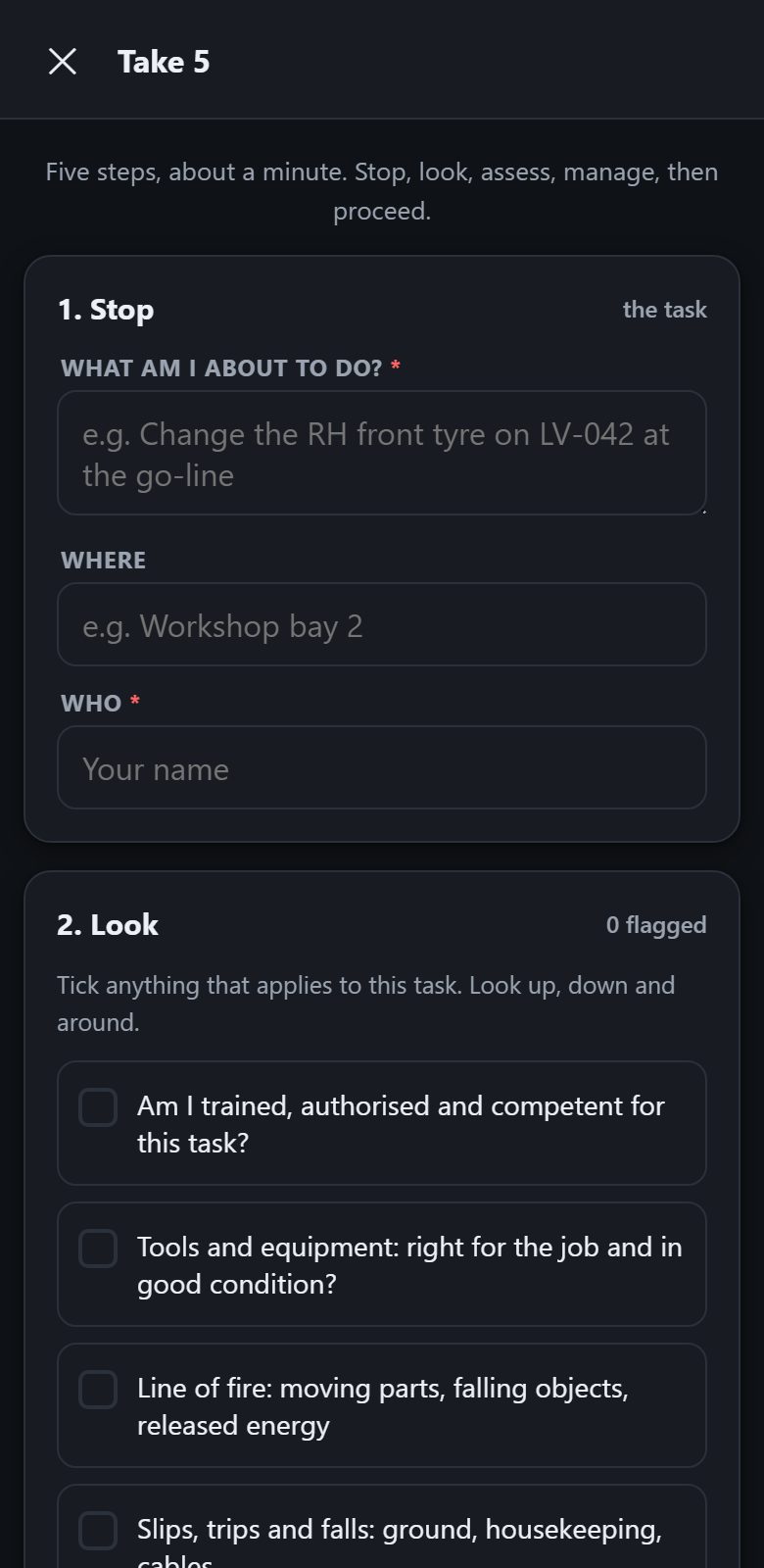
The personal risk assessment a worker does in the minute before starting a task. Five steps, and the app walks through them in order.
- Stop. What am I about to do, where, and who am I.
- Look. Tick anything that is a problem for this task from a prompt list: line of fire, stored energy, working at height, other people in the area, and the rest. Every tick needs a control before you can proceed.
- Assess. Worst realistic outcome, and how likely it is.
- Manage. Choose the controls, add anything specific to this task.
- Proceed, or stop work. A Take 5 that ends in stop work is a good Take 5, and the app says so rather than nudging towards a tick.
The result is recorded as PROCEED or STOP WORK, and a stop work shows on the dashboard as needing attention.
Pre-start inspections
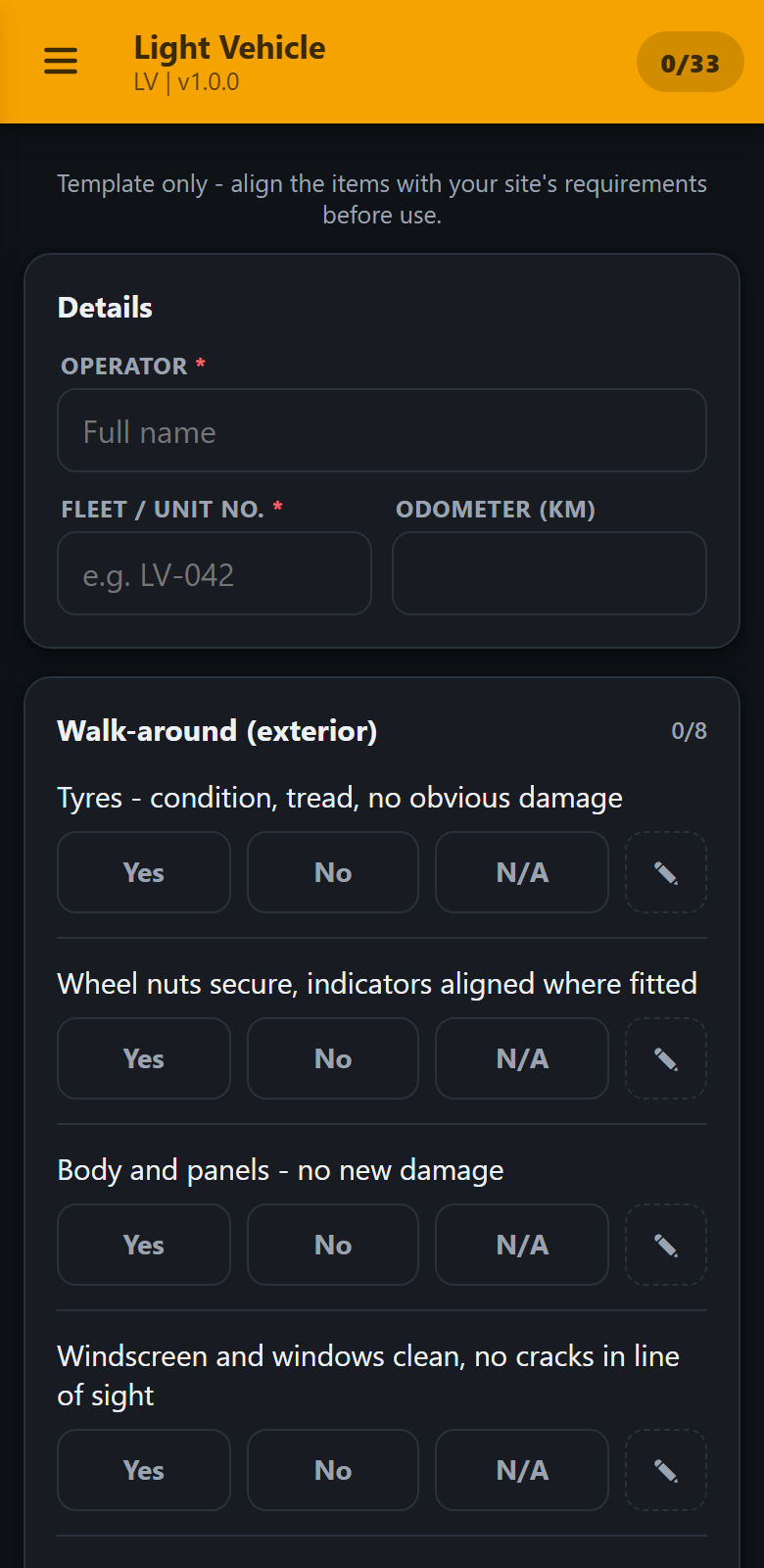
The daily equipment check. Every item is answered Yes, No or N/A, grouped into the sections your template defines.
- Critical items. Mark an item critical and a No answer fails the whole inspection, whatever else passed. Brakes and seatbelts should never be outvoted by thirty tidy items.
- Notes and photos on failures. Anything marked No takes a note and up to three photographs.
- Favourites and unit history. Save a machine you check often as a favourite, up to five, and type a fleet number to see what the last inspection of that unit found.
- Drafts survive. An interrupted inspection, a flat battery or a phone that went to sleep does not lose the work. It is restored on reopening.
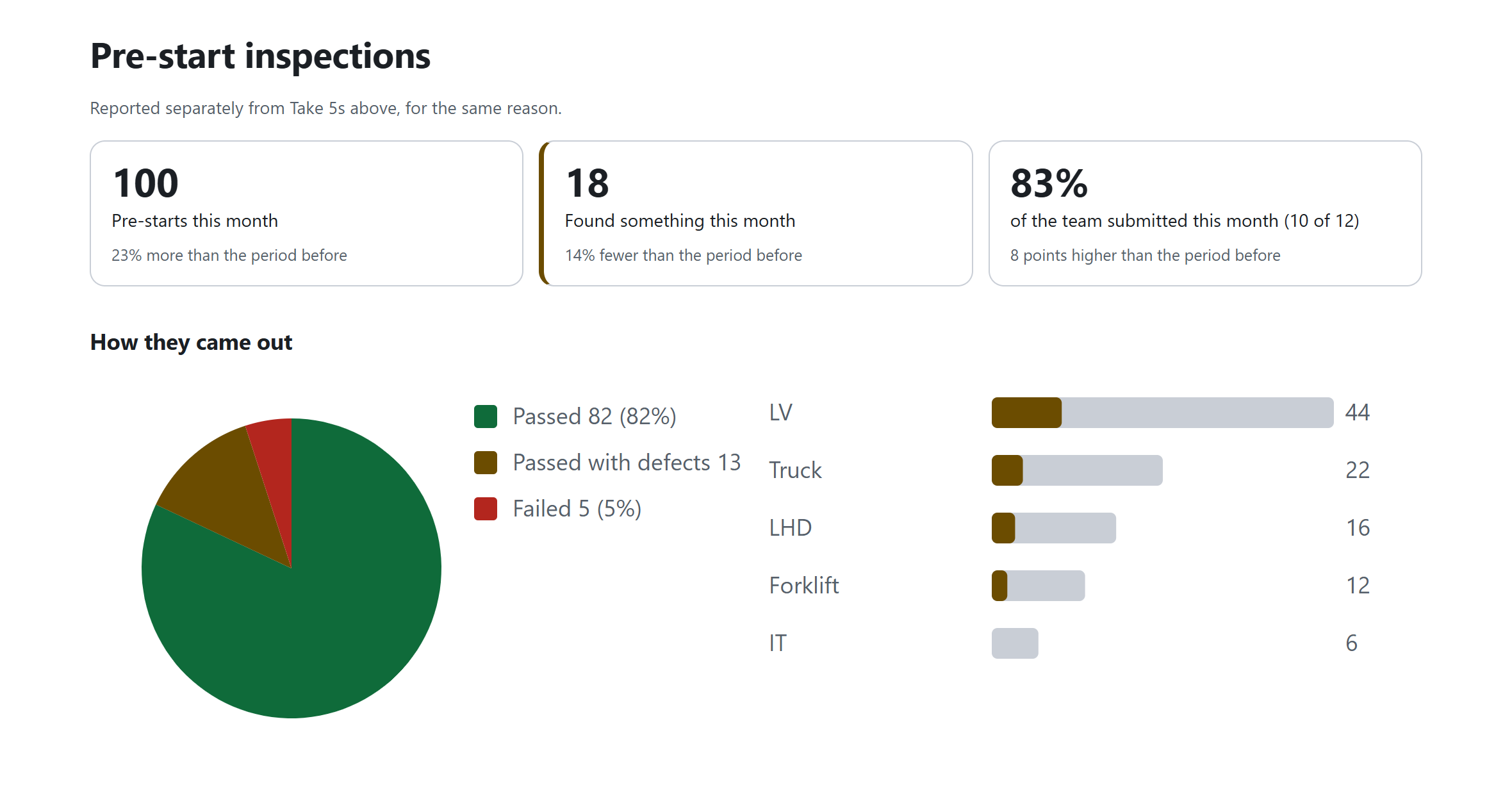
The outcome is PASS, PASS WITH DEFECTS or FAIL, and it is printed across the top of the PDF where nobody can miss it.
Your own forms
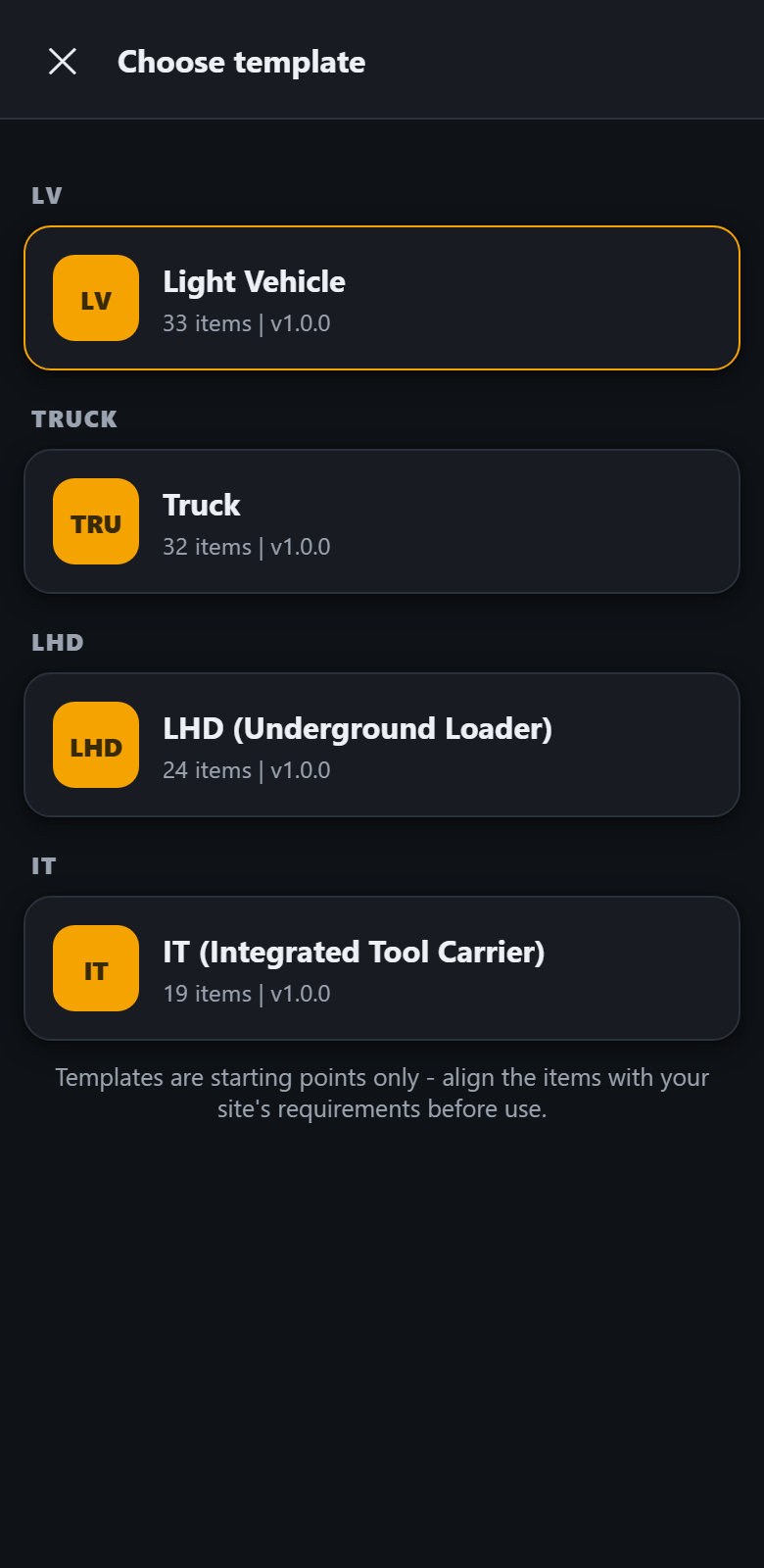
Five templates ship with the app: light vehicle, truck, underground loader, integrated tool carrier and forklift. They are a starting point, not a standard, and the app is built on the assumption that you will change them.
A template is a spreadsheet with three columns: the section, the item, and whether it is critical. Export a starter file, edit it in Excel, import it back. There is nothing to learn and no technical help needed.
You can also add the fields the operator fills in before starting, such as an odometer reading or a shift dropdown, by adding a few lines at the top of the same sheet. A phone that is not on a team keeps up to three templates beyond the built-in ones; a phone on a team has no cap.
On a paid plan, an admin publishes a checklist from the team's Team page on the website - upload the same spreadsheet, or a template exported from the app - and every enrolled phone picks it up on its own within a day of next being opened. A change made once reaches the whole crew without visiting a single phone.
The full format is in the template writing guide.
The record itself
What comes out the other end, and where it goes.
Signed PDF
Produced on the device the moment the inspection is completed. It carries the answers, the notes, the defect photographs, the operator's drawn signature, the declaration they signed against, and the time.
Saved before sending
The PDF is written to the phone first, every time, whether or not there is a connection and whether or not you have an account. Nothing is conditional on the network.
Location stamp
On the phone apps, if the worker allows location access, an approximate position is recorded at submission and printed on the PDF. Decline it and the record is completed without one.
Queued upload
On a team plan, records queue on the device and upload themselves when coverage returns. A shift underground arrives at the surface and sends itself.
Share anywhere
Any record can be shared straight from the phone through the normal share sheet: email, Teams, WhatsApp, anything installed. Useful on the free tier where there is no dashboard.
Machine readable too
Each record is also stored as structured data alongside the PDF, so an export into another system later is a data problem rather than an archaeology problem.
Supervisor dashboard
A web page, not another app to install. It opens on the site office PC or on a phone.
Failures first
The header counts what needs attention over the last 30 days, how many records came in, how many machines were checked, and how many passed clean. Anything that failed, noted defects or ended in stop work is one tap away.
Filter by machine
Type a fleet number and see that unit's history. Useful when a machine is about to go to the workshop and somebody asks what has been reported on it.
Daily report export
Download whatever is currently filtered as a spreadsheet that opens straight into Excel. The export follows the same filter as the screen, so the numbers cannot disagree.
Archive rather than delete
The everyday action hides a record from the working list without destroying it, because safety records usually have to be kept. Permanent deletion exists, but it asks you to type the record's reference first.
Insights
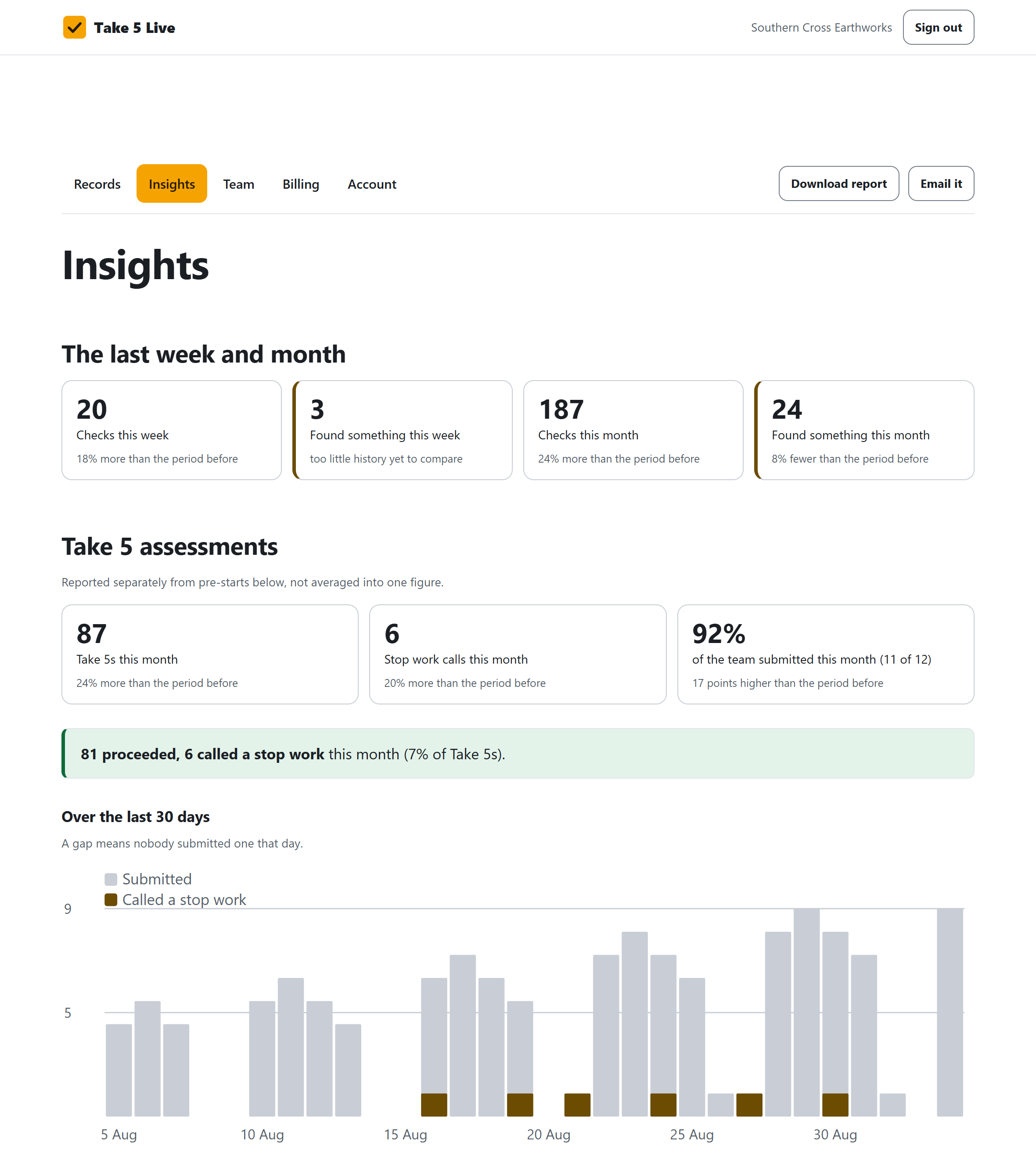
The numbers a supervisor gets asked for: whether checks are happening, whether that is improving, and which machines actually need attention.
Take 5s and pre-starts, kept apart
A Take 5 is a worker's judgement about a task. A pre-start is a machine's condition. Averaging the two into one figure answers a question nobody asked, so volume, results and trends are reported separately for each.
Thirty days, and month by month
A daily chart for the last thirty days, and a longer view month by month, so a change shows up as a trend rather than a single number with nothing to compare it to.
Who is actually doing them
Not just how many checks came in - how many different people submitted one, against the size of the team. The same total looks different carried by one keen worker than spread across the whole crew, and this is the only place that shows which.
Problem machines, ranked properly
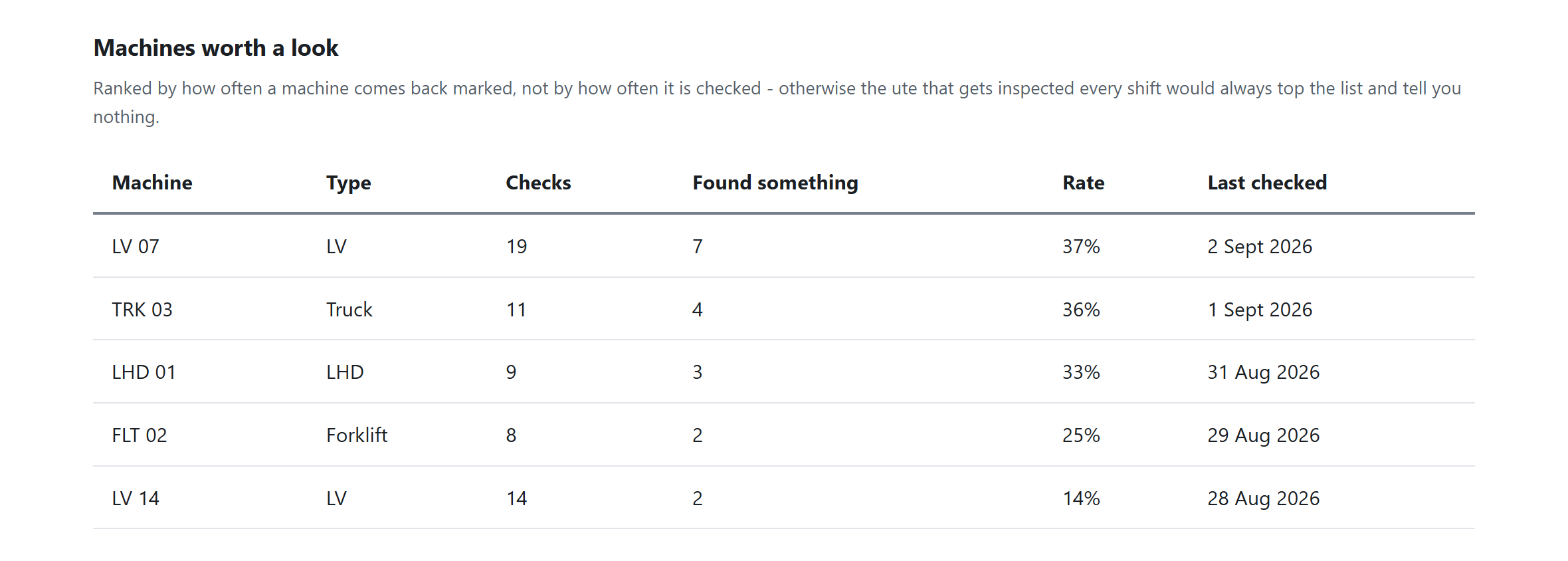
Ranked by how often a machine comes back marked, not by how often it is checked - so the ute inspected every shift does not top the list for being used, and the machine that quietly keeps failing does.
Download the report
One button turns the page into a clean report ready to print or save as a PDF - the same numbers on screen, laid out for a client or a regulator, with no second copy that can drift out of sync with the dashboard.
Or have it emailed
A supervisor can send the numbers from the Insights page to their own inbox, or to anyone else's - a client, a regulator, whoever asked for it - without them needing a login.
Teams, roles and joining
Getting thirty phones configured is normally the worst part of rolling out a tool like this. It is one scan here.
Join by QR code
Generate an invite and print the code, or send the link, to add people to the team. Phones are set up with a separate set-up code from the same page, scanned in the app, so no address or key is typed into a phone in a workshop.
Three roles
Owner pays and can do everything. Supervisor sees the dashboard and every record. Worker submits from the app and has no dashboard access; their own copies stay on their phone. Every member takes one seat whatever their role.
Remove somebody properly
Removing a member frees the seat and revokes any phone set up in their name; a spare handset that belongs to a machine is revoked from the Devices list. The records they already submitted stay, because they are the company's safety records.
What it deliberately does not do
Take 5 Live records inspections. It does not certify anything, approve equipment, or discharge a duty under work health and safety law. It has no certification and no regulator endorsement, and the built-in templates reflect common industry practice, which is not the same thing as a standard. See the terms.
The app is free. Always.
Put it on your own phone this afternoon and do a real pre-start with it. Nothing is switched off and nothing expires. Decide about the dashboard afterwards, once you know whether you want the records in one place.